🚚 Free Shipping On Prepaid Order•💳 Cash On Delivery•🔒 100% Secure Payments•🛡️ Genuine Products with Warranty•⚡ Fast Dispatch Across India•📦 Easy Returns & Customer Support•🛡 Warranty Available on Mobile Repair Parts•🔋 999+ Mobile & Laptop Battery Models Available•📱 Mobile Parts & Accessories•👕 Men's & Women's Fashion Collection


How to Identify Original Mobile Parts: Display, IC, Battery & More | Welzone.in

When your phone breaks, the biggest challenge is not only repair cost — it is choosing the right original mobile parts. Many users buy cheap duplicate parts thinking they are saving money, but later face issues like poor display quality, fast battery drain, heating, touch problems, or complete part failure.
If you want your phone to work like new, learning how to identify original mobile parts is very important. In this guide, you will learn simple ways to check genuine parts such as mobile display, mobile IC, battery, flex cable, charging port, speaker, and other spare parts before buying.
At Welzone.in, the goal is to help users choose quality parts that improve repair success and reduce return problems.
Why Original Mobile Parts Matter
Original parts are built to match your device’s design, performance, and compatibility. Duplicate or low-quality parts may look similar from outside, but inside they are often made with cheaper materials and weaker testing standards.
Using original parts can help you:
- Improve phone performance
- Avoid repeat repairs
- Maintain display brightness and touch accuracy
- Reduce overheating and battery issues
- Keep the device’s lifespan longer
- Improve customer trust if you sell repair services
For businesses and technicians, selling genuine parts also means fewer complaints and better repeat customers.
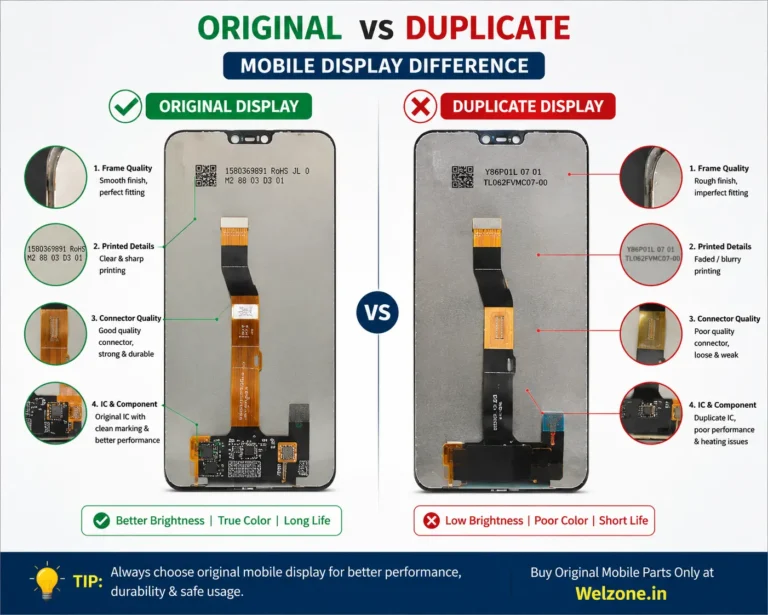
How to Identify an Original Mobile Display
The mobile display is one of the most commonly replaced parts and also one of the most duplicated. A fake or low-grade display may look fine at first, but problems appear quickly.
Check these points:
1. Display brightness
Original displays usually have proper brightness, color balance, and visibility in sunlight. Duplicate displays may look dull or overly sharp.
2. Touch response
A genuine display gives smooth and accurate touch. Cheap copies may lag, miss touches, or feel uneven.
3. Color quality
Original screens show natural colors. Fake displays often have bluish, yellowish, or faded color tones.
4. Border fitting
Original or high-quality OEM parts fit properly in the frame. Poor parts may leave gaps or uneven edges.
5. Flex cable and connector quality
Check whether the flex cable looks clean, properly finished, and matching the original design.
6. Testing before installation
Always test the display before full fitting. Check brightness, touch, dead pixels, line issues, and backlight.
Common warning signs of fake display
- Low brightness even at full level
- Delayed touch response
- Color shift after a few days
- Dead pixels or green lines
- Weak glue or poor fitting
How to Identify Original Mobile IC
Mobile ICs are the brain of many device functions. These include power IC, charging IC, audio IC, network IC, display IC, and touch IC. A wrong or duplicate IC can create serious repair issues.
IC identification tips:
1. Check brand marking and printing
Original ICs usually have clear and neat markings. Fake ICs may have blurred, crooked, or shallow printing.
2. Look at pin quality
Genuine IC pins are well-made and consistent. Poor-quality ICs often show uneven finishing.
3. Confirm compatibility
The IC must match the exact phone model and board version. Even a small mismatch can cause failure.
4. Observe packing and sourcing
Buy ICs from trusted vendors who clearly mention model compatibility and testing status.
5. Ask for pre-tested parts
For repair business, pre-tested ICs are often safer than unverified stock.
Signs of duplicate or damaged IC
- Device not powering on properly
- Sudden heating after repair
- Charging failure
- No sound or network issue
- Random restart after installation
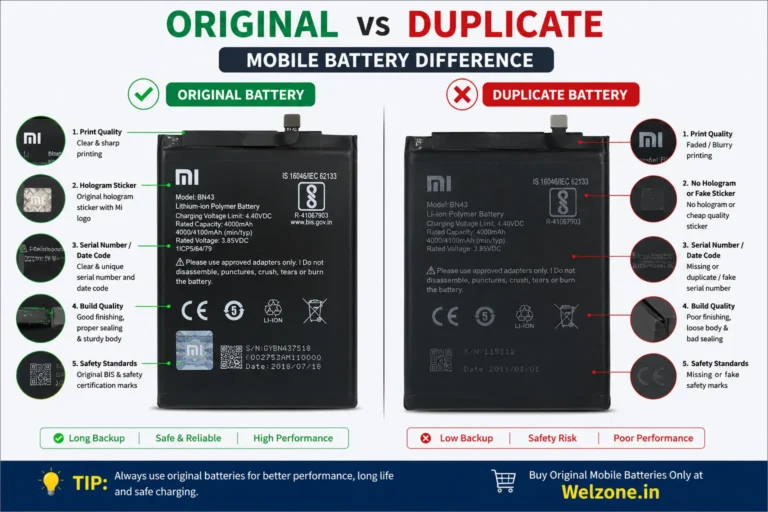
How to Check Original Battery
Battery quality directly affects phone backup, safety, and heating. Fake batteries are risky because they may overheat or swell.
Check:
- Brand label quality
- Battery capacity details
- Connector finish
- Weight consistency
- Date code and batch details
- Cell quality and packaging
A genuine battery usually performs better, charges safely, and lasts longer.
How to Identify Original Charging Port and Flex Cable
Charging issues are common, but many people buy cheap charging flex parts that fail quickly.
Look for:
- Clean connector points
- Accurate shape and hole alignment
- Proper microphone and sensor support
- Flexible but strong material
- Exact model match
If the part is not a perfect match, the phone may charge slowly or stop detecting the cable.
Quick Checklist Before Buying Any Mobile Part
Use this checklist every time:
- Match exact phone model
- Check part photos carefully
- Ask whether it is original, OEM, or compatible
- Confirm warranty or replacement policy
- Buy from a trusted seller
- Test the part before final installation
- Compare weight, finish, and connector shape
- Avoid prices that look too cheap
Original vs Duplicate Parts: Simple Difference
| Feature | Original Part | Duplicate Part |
|---|---|---|
| Fit | Perfect | May be loose |
| Performance | Stable | Often inconsistent |
| Life span | Longer | Shorter |
| Touch / Display | Smooth | Lag or dull |
| Safety | Better | Risky |
| Return rate | Low | High |
This is why professionals prefer trusted spare parts even if the initial price is slightly higher.
Best Way to Buy Genuine Mobile Parts Online
Before ordering online, make sure the seller provides:
- Clear product name
- Exact model number
- Real images
- Return or exchange support
- Transparent quality category
- Fast support for queries
If you run a repair shop, buying from a reliable source can save time, reduce complaints, and improve profits.